
- Catalogs
- SICK SENSOR INTELLIGENCE
- CLV63x, CLV64x, CLV65x


CLV63x, CLV64x, CLV65x

CLV63x, CLV64x, CLV65x
This document provides comprehensive operating instructions for SICK AG's barcode scanners (CLV63x, CLV64x, CLV65x). It is intended for qualified personnel and includes safety notes, handling instructions, and is part of the product package.
The devices are designed for barcode identification and decoding on moving or stationary objects. Improper use includes operation in explosion-hazardous areas or under low temperatures. Users must ensure data integrity and confidentiality through security measures.
Details on product ID, characteristics, and device variants for different applications are provided.
Guidelines for safe transport and storage to prevent damage are outlined.
Instructions for mounting the device, including preparation, location selection, and optional shock mounts, are detailed.
Safety prerequisites and wiring instructions are provided to ensure safe device operation.
Steps for initial commissioning and configuration using SOPAS ET software are described.
Information on operating indicators and options is included for effective device use.
Regular maintenance and cleaning procedures are recommended to ensure device longevity.
A guide to identifying and resolving common errors and faults is provided.
Instructions for safe disassembly and disposal of the device are included.
Technical specifications, including optics, performance, interfaces, and environmental data, are detailed.
Information on additional accessories available for the devices is provided.
Modifying the device or its software can lead to unforeseen dangers and void any warranty claims.
Only trained personnel should handle the device to prevent injury and damage.
The device uses a Class 2 laser, which is safe for brief exposure but can damage the retina with prolonged exposure.
Switching off the device may result in the loss of temporary data.
The device is designed to minimize environmental impact.
Repairs should only be conducted by authorized personnel from SICK AG.
Details on wiring and connections to the host/PC and external sensors are provided.
Figures illustrate the connection facilities for CLV63x to CLV65x devices.
The device requires an external signal to start a read process.
Exclusive to CLV65x, this function allows the device to independently set the focus position.
Focus positions can be dynamically changed to cover a larger read area.
For line scanners with oscillating mirrors, the scan line position is influenced by mirror configuration.
In "start/stop" mode, objects are read individually, controlled by read cycle sensors.
Devices must be transported with shock and damp protection.
Instructions for selecting and preparing the mounting location are provided.
Devices that are visibly damaged should not be operated.
The delivery includes the device without a bracket and multilingual safety notes.
Ensure sufficient space and direct line of sight to the barcode.
The device can be mounted using SICK or custom brackets.
Consider scan line allocation, reading distance, and angle alignment.
Two main mounting variants are available: suspended horizontal mounting and standing horizontal mounting.
Connection modules should be mounted near the device.
Only qualified personnel should perform electrical installations.
Use only screened cables with twisted-pair wires for data transmission.
Details on various connectors used for Ethernet and other connections are provided.
General notes on ensuring no power during connections and avoiding low temperatures are provided.
Details on Ethernet, serial data, and CAN interfaces are provided.
Steps for device commissioning, software installation, and configuration are provided.
The SOPAS-ET configuration software offers several key functions for device management.
Instructions for downloading and installing SOPAS-ET are provided.
Instructions for establishing a connection with the device are provided.
Instructions for adjusting the device using SOPAS-ET are provided.
The device can save one application-specific parameter set.
Instructions for aligning the device for optimal reading are provided.
Instructions for using the Quickstart tab and application wizard are provided.
The device features LED indicators for various statuses.
Configuration can be done locally using SOPAS-ET or through command strings.
The device operates automatically and is maintenance-free under normal conditions.
Regular cleaning of the reading window and housing is necessary.
Common errors include misalignment, incorrect wiring, and configuration issues.
Instructions for disassembling and disposing of the device are provided.
Detailed specifications for the CLV63x, CLV64x, and CLV65x models are provided.
Details on connection modules, digital switching outputs, and optical indicators are provided.
Details on supply voltage, power consumption, and housing are provided.
Details on operating temperatures and compliance with EMC standards are provided.
Diagrams illustrating reading fields for different ranges and configurations are provided.
All specifications are subject to change without notice.
Details on reading distances, focus positions, and resolutions are provided.
Diagrams depicting reading field dimensions and oscillating mirror deflection widths are provided.
Additional accessories such as brackets and cables are listed.
Guidelines for integrating the barcode scanners into a PROFINET network are provided.
The devices are certified to UL60950-1, with specific power supply requirements for UL-compliant operation.
Dimensional drawings and CAD data for the devices can be downloaded from the SICK website.
Catalog excerpts

OPERATING INSTRUCTIONS
Open the catalog to page 1
Described product CLV63x CLV64x CLV65x Manufacturer SICK AG Erwin-Sick-Str. 1 79183 Waldkirch Germany Legal information This work is protected by copyright. Any rights derived from the copyright shall be reserved for SICK AG. Reproduction of this document or parts of this document is only permissible within the limits of the legal determination of Copyright Law. Any modifica‐ tion, abridgment or translation of this document is prohibited without the express writ‐ ten permission of SICK AG. The trademarks stated in this document are the property of their respective owner. © SICK AG. All rights...
Open the catalog to page 2
8019588/129Z/2019-02-07 | SICK Subject to change without notice
Open the catalog to page 3
8019588/129Z/2019-02-07 | SICK Subject to change without notice
Open the catalog to page 4
ABOUT THIS DOCUMENT 1 About this document Information on the operating instructions These operating instructions provide important information on how to use devices from SICK AG. Prerequisites for safe work are: Compliance with all safety notes and handling instructions supplied. Compliance with local work safety regulations and general safety regulations for device applications The operating instructions are intended to be used by qualified personnel and electrical specialists. NOTE Read these operating instructions carefully before starting any work on the device, in order to familiarize yourself...
Open the catalog to page 5
1 ABOUT THIS DOCUMENT WARNING … indicates a potentially dangerous situation, which may lead to a fatality or serious injuries if not prevented. CAUTION … indicates a potentially dangerous situation, which may lead to minor/slight injuries if not prevented. NOTICE … indicates a potentially harmful situation, which may lead to material damage if not prevented. NOTE … highlights useful tips and recommendations as well as information for efficient and trouble-free operation. Further information NOTE All the documentation available for the device can be found on the online product page at: The following...
Open the catalog to page 6
Safety information Intended use The device is an intelligent, opto-electronic SICK ID sensor and is used for automatic, fixed identification and decoding of bar codes on moving or stationary objects. The data content of the decoded bar codes is sent by the device to a higher-level control (PLC) for further coordinating processing. NOTE The bar codes being read must conform to at least quality level C in accordance with ISO/IEC 15416. SICK AG assumes no liability for losses or damage arising from the use of the product, either directly or indirectly. This applies in particular to use of the product...
Open the catalog to page 7
2.5 ■ Use of untrained staff ■ Unauthorized conversions ■ Technical modifications ■ Use of unauthorized spare parts, consumables, and accessories With special variants, where optional extras have been ordered, or owing to the latest technical changes, the actual scope of delivery may vary from the features and illustrations shown here. Modifications and conversions NOTICE Modifications and conversions to the device may result in unforeseeable dangers. Interrupting or modifying the device or SICK software will invalidate any warranty claims against SICK AG. This applies in particular to opening...
Open the catalog to page 8
SAFETY INFORMATION 2 Activities Hazard warnings and operational safety To reduce health risks and to avoid dangerous situations, observe the safety notes and warnings set out in the following chapters of these operating instructions. Laser radiation The device works with a red light laser diode in the wavelength range between 655 nm (CLV63x-64x) and 658 nm (CLV65x). CAUTION Optical radiation: Laser class 2 The human eye is not at risk when briefly exposed to the radiation for up to 0.25 seconds. Exposure to the laser beam for longer periods of time may cause damage to the retina. The laser radiation...
Open the catalog to page 9
2 SAFETY INFORMATION Laser class Figure 1: Laser output aperture of the different designs The device complies with laser class 2. The entire reading window is a laser output aperture. NOTE No maintenance is required to ensure compliance with Laser Class 2. Warning symbol on the device The colored laser warning label is fitted in combination with the type label on the rear of the device. In addition to other information, the type label of the device in use also contains the laser output data. This consists of: Laser output power (maximum/average), wave‐ length or wavelength range, and pulse time...
Open the catalog to page 10
Figure 2: Example of a laser warning sign on the device What the laser warning label means: Laser radiation – Never look into the light beam – Laser class 2 NOTE Additional laser warning label If the laser warning label applied to the device is concealed when the device is installed into a machine or paneling, the laser beam outlet opening must be suitably labeled. For this purpose, an additional warning label of the same type must be applied next to the outlet opening. Controlling the laser diode When operating properly, the device only switches the laser diode on if there is an object in the...
Open the catalog to page 11
Switching off the device When switching off the device, at the most, the following data will be lost: ■ ■ ■ Application-specific parameter sets that were only temporarily stored in the device Last reading result Daily operating hours counter Protection of the environment During construction of the device, attention was paid to achieving the smallest environ‐ mental impact possible. Apart from the housing, the device contains no materials using silicon. Repairs Repair work on the device may only be performed by qualified and authorized person‐ nel from SICK AG. Interruptions or modifications to...
Open the catalog to page 12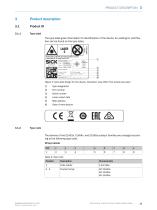
Type labelThe type label gives information for identification of the device. An existing UL certification can be found on the type label. 2 3 4 © © Figure 3: Type label design for the device, illustration may differ from actual type label @ Serial number 4 Laser output data 3.1.2 Type codeThe devices of the CLV63x, CLV64x, and CLV65x product families are arranged according to the following type code: CLVxyz-abcde CLV Table 2: Type code 8019588/129Z/2019-02-07 | SICK Subject to change without notice
Open the catalog to page 13All SICK SENSOR INTELLIGENCE catalogs and technical brochures
 REGISTRATION SENSORS
24 Pages
 WTB16 Bluetooth®
135 Pages
 WE9LC-3_A71
3 Pages
 Safety Switches
20 Pages
 Automation light grids
8 Pages
 Encoders and Inclination Sensors
32 Pages
 Proximity Sensors
324 Pages
 Dust measuring devices
172 Pages
 Detection and Ranging Solutions
124 Pages
 Distance Sensors
404 Pages
 Vision
124 Pages
 Top-Products from SICK
556 Pages
 Fluid Sensors
243 Pages
 Registration Sensors
276 Pages
 Magnetic Cylinder Sensors
164 Pages
 Hand-Held Scanners IDMx
48 Pages
 IDENTIFICATION SOLUTIONS
24 Pages
 Our identification solutions
8 Pages
 FLOWSIC300 Ultrasonic Gas Flow Meter
177 Pages
 FLOWSIC300 Gas flow meters
12 Pages
 FLOWSIC500 Gas flow meters
16 Pages
 FLOWSIC600 Ultrasonic Gas Flow Meter
138 Pages
 FLOWSIC600 Gas Flow Meter
16 Pages
 ConVer
12 Pages
 GM32 In-situ gas analyzers
28 Pages
 GM35 In-Situ IR Gas Analyzer
16 Pages
 Encoders
788 Pages
 Photoelectric Sensors
949 Pages
 Opto Electronic Protective Devices
712 Pages
 GMS800 Extractive Gas Analyzers
20 Pages
 WT100-2 energetic
47 Pages
 VPS Pro Profiling systems
20 Pages
 G6 - Global Sensor
20 Pages


- Airport camera
- Surveillance radar
- Laser scanner
- Aeronautic laser scanner
- Non-contact laser scanner
- Land-based radar
- Spark optical emission camera
- Airport barcode reader
- Measurement laser scanner
- 2D barcode reader
- Fixed barcode reader
- 1D barcode reader
- Baggage barcode reader
- 3D laser scanner
- RFID airport reader
- Portable barcode reader
- Detection radar
- Portable RFID reader
- USB barcode reader
- Boarding pass barcode reader