
- Catalogs
- CEM Systems
- AC2000 Minerva

AC2000 Minerva

AC2000 Minerva
- Instant alarm notifications within the AC2000 Security Hub module.
- Integration with existing AC2000 installations.
- Support for MX Speak protocol via an external MX BACnet Converter.
- Graphical representation of MX Components' states.
- Enables full integration of alarms/events from MX Panels, Sensors, and Zones with AC2000.
- Acts as a central Security Management System (SMS) for monitoring and reporting building security events.
- Supports uni-directional communication for receiving alarms from up to 99 Fire Panels.
- Panels interface with TCP/IP LAN using a programmed MX Speak/BACnet Converter.
- Data is transmitted in native MX Speak protocol and converted to BACnet for processing by AC2000.
- MX Panel configuration can be imported into the AC2000 database using the MxCfgImport tool.
- No additional software or hardware required for integration.
- Fire alarms are managed centrally via the AC2000 Security Hub application.
- Alarms can activate external systems like CCTV or trigger video recording.
- AC2000 v7.0 and higher, AC2000 Airport v7.0 and higher.
- MX BACnet Converter (MOXA UC-7101).
- Minerva MX Range Fire Panels supporting MX Speak Protocol v3.x, v4.x & v5.x.
Catalog excerpts
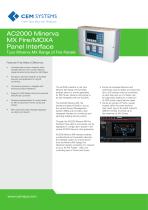
CEM SYSTEMSFrom Tyco Security Products AC2000 Minerva MX Fire/MOXA Panel Interface Tyco Minerva MX Range of Fire Panels Features That Make a Difference: • Activated alarms shown instantly within AC2000 Security Hub module; Minerva panels sensors/icons placed on AED Maps • Fire alarms reported instantly on AC2000 Security Hub application for central monitoring • Convenient and easy to integrate with existing AC2000 installations • Support for MX Speak protocol via external MX BACnet Converter • Graphical representation of current states for MX Components: Points, Zones and Panels • MX Component state changes displayed as Alarms and Events The AC2000 interface to the Tyco Minerva MX Range of Fire Panels enables alarms or events generated for MX Panels, Sensors and Zones to be fully integrated with the AC2000. The AC2000 Minerva MX Fire Interface enables AC2000 to act as the central Security Management System (SMS) and provides a fully integrated interface for monitoring and reporting building security events. Through the AC2000 Minerva MX Fire Interface these alarms and events can be displayed in a single alarm screen in the central AC2000 Security Hub application. AC2000 Minerva MX Interface enables uni-directional communication allowing the AC2000 system to receive alarms from the Minerva MX Range Fire Detection System consisting of a network of up to 99 Fire Panels - each one controlling sets of Points and Zones: • Points are individual Sensors and Call-Points used to detect and report fire. Up to 250 sensors may be connected to each loop and up to 8 loops may be supported, leading to a maximum of 2000 points supported per panel. • Zones are groups of Points, usually located within the same physical area. Each type of fire panel supports different number of Zones up to the maximum of 240 Zones.
Open the catalog to page 1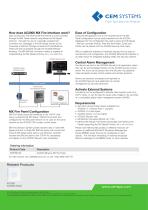
CEM SYSTEMS From Tyco Security Products How does AC2000 MX Fire Interface work? Data coming from the Minerva MX Fire Panels is communicated through the MX Panel network using Minerva's MX Speak protocol. Through the use of a specially programmed converter unit, messages in the MX Speak format can be converted to BACnet Change-of-Value (COV) Notifications. These are then processed through the AC2000 BACnet Interface. The MX-BACnet Converter module is capable of understanding the MX Speak protocol v3.x, v4.x and v5.x. MX Fire Panel Configuration MX Fire Panels should be interfaced to the TCP/IP...
Open the catalog to page 2All CEM Systems catalogs and technical brochures
 Suprema BioStar 2
3 Pages
 SALTO SALLIS
2 Pages
 emerald TS100f
5 Pages
 S700s
S700s4 Pages
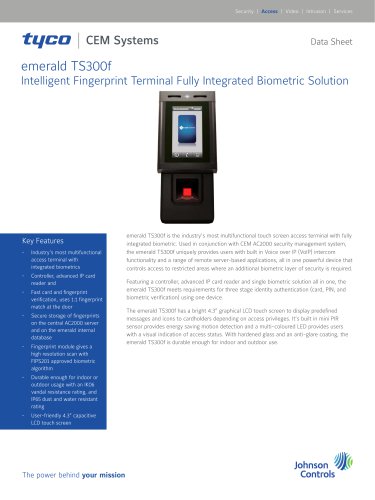 emerald TS300f
6 Pages
Archived catalogs
 Access Control Systems
27 Pages
 emerald
6 Pages
 S9032 Lift Controller
2 Pages
 Type 2 Lift Interface
2 Pages
 Product Catalogue
27 Pages
 S3040 Portable Reader
2 Pages
 S610f Fingerprint Reader
2 Pages
 AC2000 Security Hub
12 Pages
 AC2000 ENTERPRISE
5 Pages
 AC2000 INTEGRATED SOLUTIONS
5 Pages
 AC2000 FireClass Interface
2 Pages
 2017 AC2000
5 Pages
 Product catalog 2019 - 2020
56 Pages
 2017 AC2000 AIRPORT
5 Pages
 2017 AC2000 LITE
5 Pages
 CEM DESfire Smartcard
2 Pages
 AC2000 DSC
2 Pages
 S610s Reader
2 Pages
 AC2000 AIRPORT
5 Pages
 AC2000 LITE
5 Pages
 AC2000
5 Pages


- Aeronautical software
- Airport software
- Cloud-based software
- Fingerprint reader
- Biometric fingerprint reader
- Web-based software
- Optical fingerprint reader
- Lock
- Airport lock
- Mechanical lock
- High security lock
- Airport card reader
- Access control card reader
- Airport fingerprint reader
- Card fingerprint reader
- RFID card reader
- Smart card reader
- Card reader with integrated keypad